body{ font-family: "Times New Roman", Times, serif; font-size : 20px; } .top-nav, .top-nav ul li a { font-family: "Arial Black", Gadget, sans-serif; font-size : 20px; } #main-nav, #main-nav ul li a{ font-family: Impact, Charcoal, sans-serif; font-size : 20px; } .breaking-news span.breaking-news-title{ font-family: "Times New Roman", Times, serif; color :#000000; font-size : 24px; } .page-title{ font-family: Tahoma, Geneva, sans-serif; color :#000000; font-size : 40px; } .post-title{ font-family: Tahoma, Geneva, sans-serif; color :#000000; font-size : 40px; } h2.post-box-title, h2.post-box-title a{ font-family: "Arial Black", Gadget, sans-serif; color :#000000; font-size : 30px; } h3.post-box-title, h3.post-box-title a{ font-family: Arial, Helvetica, sans-serif; color :#000000; font-size : 20px; } p.post-meta, p.post-meta a{ font-family: "Arial Black", Gadget, sans-serif; color :#000000; font-size : 12px; } body.single .entry, body.page .entry{ font-family: "Times New Roman", Times, serif; color :#000000; font-size : 22px; } blockquote p{ font-family: "Times New Roman", Times, serif; color :#000000; font-size : 25px; } .widget-top h4, .widget-top h4 a{ font-family: "Arial Black", Gadget, sans-serif; color :#000000; font-size : 20px; } .footer-widget-top h4, .footer-widget-top h4 a{ font-family: "Arial Black", Gadget, sans-serif; color :#000000; font-size : 25px; } #featured-posts .featured-title h2 a{ font-family: Impact, Charcoal, sans-serif; color :#FFFFFF; font-size : 40px; } .ei-title h2, .slider-caption h2 a, .content .slider-caption h2 a, .slider-caption h2, .content .slider-caption h2, .content .ei-title h2{ font-family: Impact, Charcoal, sans-serif; color :#FFFFFF; font-size : 40px; } .cat-box-title h2, .cat-box-title h2 a, .block-head h3, #respond h3, #comments-title, h2.review-box-header, .woocommerce-tabs .entry-content h2, .woocommerce .related.products h2, .entry .woocommerce h2, .woocommerce-billing-fields h3, .woocommerce-shipping-fields h3, #order_review_heading, #bbpress-forums fieldset.bbp-form legend, #buddypress .item-body h4, #buddypress #item-body h4{ font-family: "Arial Black", Gadget, sans-serif; color :#000000; font-size : 30px; } ::-moz-selection { background: #0D8F63;} ::selection { background: #0D8F63; } #main-nav, .cat-box-content, #sidebar .widget-container, .post-listing, #commentform { border-bottom-color: #0D8F63; } .search-block .search-button, #topcontrol, #main-nav ul li.current-menu-item a, #main-nav ul li.current-menu-item a:hover, #main-nav ul li.current_page_parent a, #main-nav ul li.current_page_parent a:hover, #main-nav ul li.current-menu-parent a, #main-nav ul li.current-menu-parent a:hover, #main-nav ul li.current-page-ancestor a, #main-nav ul li.current-page-ancestor a:hover, .pagination span.current, .share-post span.share-text, .flex-control-paging li a.flex-active, .ei-slider-thumbs li.ei-slider-element, .review-percentage .review-item span span, .review-final-score, .button, a.button, a.more-link, #main-content input[type="submit"], .form-submit #submit, #login-form .login-button, .widget-feedburner .feedburner-subscribe, input[type="submit"], #buddypress button, #buddypress a.button, #buddypress input[type=submit], #buddypress input[type=reset], #buddypress ul.button-nav li a, #buddypress div.generic-button a, #buddypress .comment-reply-link, #buddypress div.item-list-tabs ul li a span, #buddypress div.item-list-tabs ul li.selected a, #buddypress div.item-list-tabs ul li.current a, #buddypress #members-directory-form div.item-list-tabs ul li.selected span, #members-list-options a.selected, #groups-list-options a.selected, body.dark-skin #buddypress div.item-list-tabs ul li a span, body.dark-skin #buddypress div.item-list-tabs ul li.selected a, body.dark-skin #buddypress div.item-list-tabs ul li.current a, body.dark-skin #members-list-options a.selected, body.dark-skin #groups-list-options a.selected, .search-block-large .search-button, #featured-posts .flex-next:hover, #featured-posts .flex-prev:hover, a.tie-cart span.shooping-count, .woocommerce span.onsale, .woocommerce-page span.onsale , .woocommerce .widget_price_filter .ui-slider .ui-slider-handle, .woocommerce-page .widget_price_filter .ui-slider .ui-slider-handle, #check-also-close, a.post-slideshow-next, a.post-slideshow-prev, .widget_price_filter .ui-slider .ui-slider-handle, .quantity .minus:hover, .quantity .plus:hover, .mejs-container .mejs-controls .mejs-time-rail .mejs-time-current, #reading-position-indicator { background-color:#0D8F63; } ::-webkit-scrollbar-thumb{ background-color:#0D8F63 !important; } #theme-footer, #theme-header, .top-nav ul li.current-menu-item:before, #main-nav .menu-sub-content , #main-nav ul ul, #check-also-box { border-top-color: #0D8F63; } .search-block:after { border-right-color:#0D8F63; } body.rtl .search-block:after { border-left-color:#0D8F63; } #main-nav ul > li.menu-item-has-children:hover > a:after, #main-nav ul > li.mega-menu:hover > a:after { border-color:transparent transparent #0D8F63; } .widget.timeline-posts li a:hover, .widget.timeline-posts li a:hover span.tie-date { color: #0D8F63; } .widget.timeline-posts li a:hover span.tie-date:before { background: #0D8F63; border-color: #0D8F63; } #order_review, #order_review_heading { border-color: #0D8F63; } body { background-color: #FFFFFF !important; background-position: top center; } a { color: #000000; text-decoration: underline; } a:hover { color: #000000; text-decoration: none; } .top-nav ul li a:hover, .top-nav ul li:hover > a, .top-nav ul :hover > a , .top-nav ul li.current-menu-item a { color: #000000; } #main-nav ul li a:hover, #main-nav ul li:hover > a, #main-nav ul :hover > a , #main-nav ul ul li:hover > a, #main-nav ul ul :hover > a { color: #000000; } #main-nav ul li a, #main-nav ul ul a, #main-nav ul.sub-menu a, #main-nav ul li.current_page_parent ul a, #main-nav ul li.current-menu-item ul a, #main-nav ul li.current-menu-parent ul a, #main-nav ul li.current-page-ancestor ul a { color: #000000; } #main-nav ul li.current-menu-item a, #main-nav ul li.current_page_parent a { color: #ffffff; } .top-nav ul li a , .top-nav ul ul a { color: #000000; } .footer-widget-top h4 { color: #000000; } #theme-footer a { color: #000000; } #theme-footer a:hover { color: #000000; } .top-nav, .top-nav ul ul { background-color:#FFFFFF !important; } #theme-footer { background-color:#0D8F63 !important; background-repeat:no-repeat !important; background-attachment:scroll !important; background-position:center top !important; } #main-nav { background: #ffffff; box-shadow: inset -1px -5px 0px -1px #0D8F63; } #main-nav ul ul, #main-nav ul li.mega-menu .mega-menu-block { background-color:#ffffff !important;} #main-nav ul li { border-color: #0D8F63; } #main-nav ul ul li, #main-nav ul ul li:first-child { border-top-color: #0D8F63; } #main-nav ul li .mega-menu-block ul.sub-menu { border-bottom-color: #0D8F63; } #main-nav ul li a { border-left-color: #0D8F63; } #main-nav ul ul li, #main-nav ul ul li:first-child { border-bottom-color: #0D8F63; } .breaking-news span.breaking-news-title {background: #0D8F63;} @media only screen and (max-width: 600px) { .term-header, .term-count { text-align: center; } } .rating-container input[type=radio] { display:inline; border: none; } .rating-container input[type=radio]:checked::before { display:none; } .average-rating span, .stars { color: #f9a028; } .average-rating { line-height: 1!important; padding-bottom: 10px; } .stars {margin-bottom:0!important;} .stars-depan {color: #f9a028;margin-top:5px} .stars-depan-2 {color: #f9a028;margin-top:10px!important} ul.ez-toc-list li:before { content: none; } a.shortc-button.green { opacity: 1 !important; -webkit-border-radius: 7px !important; -moz-border-radius: 7px !important; border-radius: 7px !important; TEXT-TRANSFORM: UPPERCASE !important; background: #02875f !important; font-size: 16px !important; font-family: "Google Sans", "Roboto","Google Sans",Arial,sans-serif !important; font-weight: 400 !important; } a.shortc-button.medium { height: 40px !important; line-height: 43px !important; width: 330px !important; }

Diy Photo Studio

Diy Photo Studio

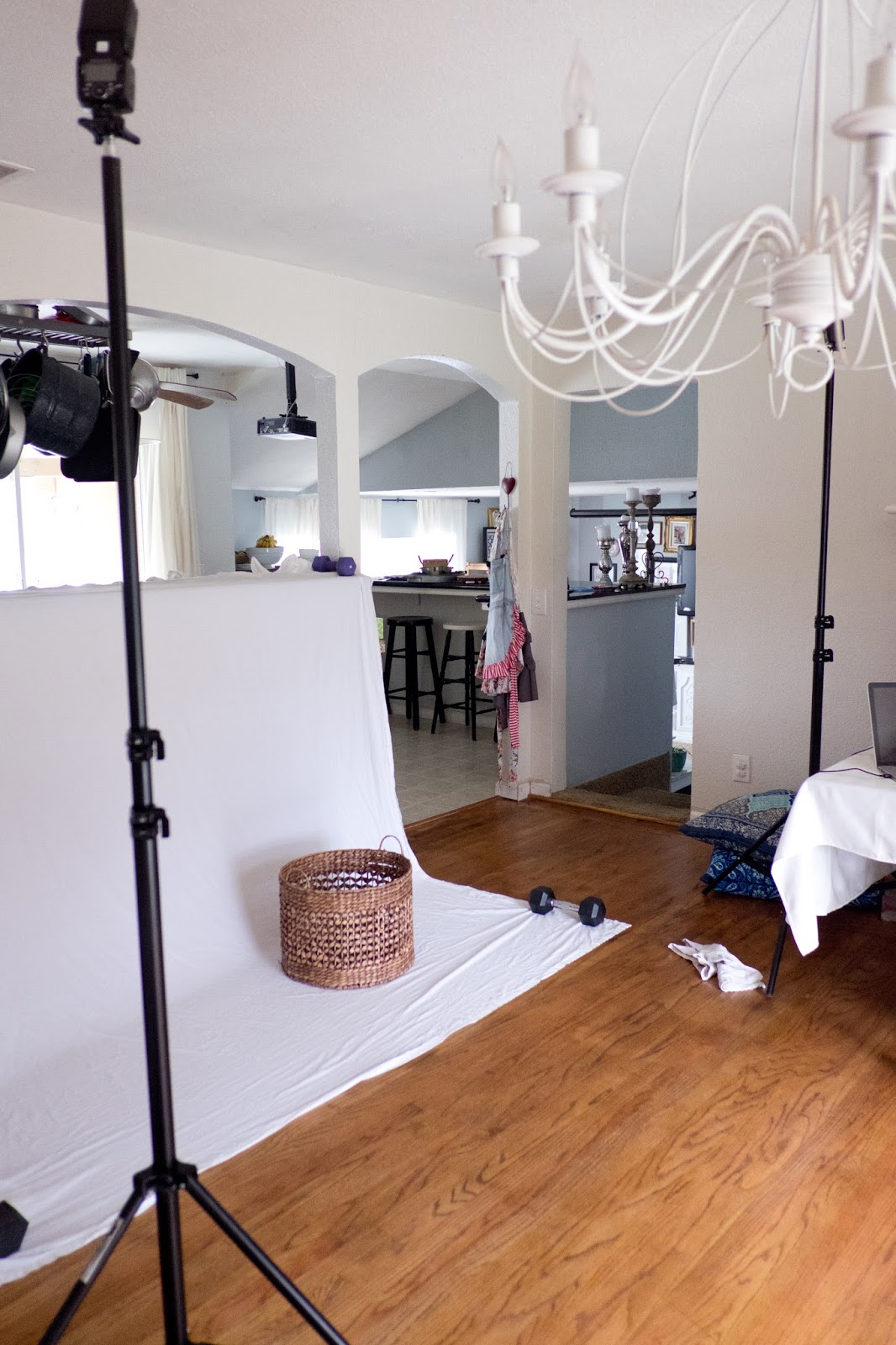
A DIY photo studio is a great way to create professional-looking photos without the expensive cost of a commercial studio. With a few simple supplies and some basic knowledge of photography, you can set up your own studio at home.

Here are some tips for creating a DIY photo studio:

  • Choose a location. Your studio should be in a well-lit area, such as a room with a large window. If you don’t have a lot of natural light, you can use artificial lighting, such as lamps or flashbulbs.
  • Create a backdrop. A backdrop is a great way to create a clean and professional look for your photos. You can use a white sheet, a seamless paper backdrop, or even a wall painted a solid color.
  • Set up your lighting. Lighting is one of the most important elements of photography. You can use natural light, artificial light, or a combination of both. If you’re using artificial light, be sure to experiment with different angles and settings to create the desired effect.
  • Use a tripod. A tripod will help you keep your camera steady and avoid blurry photos.
  • Experiment with different poses and angles. Don’t be afraid to try new things and have fun. The best way to learn is by experimenting.

Here are some additional tips for creating a DIY photo studio on a budget:

  • Use household items as props. You don’t need to buy expensive props to create great photos. Everyday items, such as books, chairs, and plants, can make great props.
  • Get creative with your lighting. If you don’t have professional lighting equipment, you can get creative with household items. For example, you can use a lampshade to diffuse light or a reflector to bounce light back onto your subject.
  • Use a free photo editing software. There are many free photo editing software programs available, such as GIMP and PhotoScape. These programs can be used to improve your photos by adjusting the brightness, contrast, and color.

With a little bit of effort, you can create a DIY photo studio that will help you take professional-looking photos at home.

Domestic Fashionista: DIY In Home Photo Studio Set Up

Do-it-Yourself Photography Studio DIY Home Studio Build | Flickr

Understanding basic studio lighting for your DIY home studio. – Doopic

The Best Ideas for Diy Photo Studio Box – Home Inspiration and Ideas

DIY at Home Studio – YouTube

DIY Product Photography Studio | How To Set Up Your Own

How to Create Your Own DIY Photo Studio — Bigstock Blog

7 DIY Studio Desk Plans for the Coolest Music Station Ever!

Domestic Fashionista: DIY In Home Photo Studio Set Up

DCJ Photography: Foto: DIY Mini Studio Photshoot

13 Easy (But Impressive!) DIY Photography Lighting Ideas

Just finished my DIY studio desk – Home Recording forums

DIY home studio. | Home, Home diy, Home studio

DIY HOME STUDIO FOR PHOTO AND VIDEO – VLOG #5 – YouTube

Domestic Fashionista: DIY In Home Photo Studio Set Up

Mini photo studio. Click to see some results! Light Box Photography

70 Favorite DIY Art Studio Small Spaces Ideas (7) | Studio space

Mit wenig Budget ein eigenes (DIY) Fotostudio einrichten – Doopic Blog

How to set up a simple natural light studio. Also looks like there are